Skip to content
Skip to main content
Rental

The Construction and Heavy Plant Hire Leader’s Guide to Operational Control

A guide for hire businesses who are questioning whether their rental management systems are equipped to keep the operation running efficiently at scale.

Back to the blog

Rental Guide Banner


Who is this blog for:

Running a profitable hire operation is certainly harder than it used to be. Costs are rising, customer expectations are higher, and margins are under more pressure than they were three years ago. The operational gaps that were manageable when conditions were more favourable are starting to have a direct financial consequence.

This blog is for senior leaders in construction, heavy plant and tool hire businesses who are starting to question whether their current rental management systems are genuinely equipped to protect margin, support growth and keep the operation running efficiently at scale.

You'll get the most from reading this blog if you're:

  • running your hire operation on a generic ERP that was never designed for rental.
  • running an on ageing industry-specific ERP that's tied to servers.
  • operating multiple depots with a large fleet and field workforce, and experience an inconsistent and unreliable picture of what's happening across the business.
  • investing in digital transformation but your ERP isn't keeping pace with the rest of your technology stack.
  • a CEO, COO, Operations Director, or a senior leader responsible for performance and efficiency of the hire operation.

The Challenge:

The growing challenge of construction, plant and tool hire.

The construction plant and tool hire sector is in good health by most measures. Infrastructure investment is sustained, demand for rental over ownership continues to grow, and the UK construction pipeline remains substantial. But growth in the market does not automatically translate to growth in the business.

Costs are rising faster than rates. Customers expect more: faster quotes, instant answers on availability, proactive communication on deliveries and collections, and increasingly, the kind of transparency and self-service they experience in other parts of their working life. The workforce is changing too. Experienced operators are retiring, and the people coming through behind them arrive with different expectations of the tools they work with. They want systems that are intuitive, fast, connected, and current, not processes that rely on manual workarounds and end-of-week reconciliations.

Against that backdrop, the operational gaps that were manageable a few years ago are starting to cost real money. A billing process that misses the occasional extra added to an existing contract that someone forgot. A maintenance schedule that reacts rather than prevents. A fleet that is harder to track across depots than it should be. Individually these are frustrations. At the scale construction, heavy plant and tool hire businesses operate, and under the margin pressure the sector is currently facing, they compound into something more significant.

There is one more pressure worth naming. Plant theft is estimated to cost the UK construction industry over £1 billion a year, with less than 25% of stolen equipment ever recovered. Insurance premiums are rising as a result, and in some cases coverage limits are being reduced. For a business with a large fleet spread across multiple depots and customer sites, knowing where every asset is and whether it is accounted for is not just an operational question. It is a financial one. 

The businesses best placed to navigate this environment share a common characteristic. They have a live, connected picture of their entire operation. They know what is out on hire, where, in what condition and whether it has been billed. They do not piece that picture together from spreadsheets, phone calls and reports that describe last week. It comes from having a system at the core of the operation that was built specifically for how hire works.

This remainder of this blog examines the most common operational challenges facing large construction, heavy plant and tool hire businesses at scale, and explains specifically how OnRent Go addresses each one.

One Connected System:

Built for hire. Not bolted together.

Every construction, heavy plant and tool hire business running on a generic ERP knows the feeling. The system handles the basics: orders get processed, invoices go out, accounts are maintained. But the moment you need it to do something specific to hire; manage a rental contract across multiple off-hire dates, track a machine’s availability across depots, apply minimum hire periods automatically, the workarounds begin.

A spreadsheet here. A manual adjustment there. A process that exists because the system can’t do it natively. Over time, those workarounds become embedded in how the business operates. They feel normal. Until you calculate what they’re really costing.
The cost is not always visible on a single contract. It shows up in the invoice that went out a week late because billing is disconnected from operations. The machine that was double-booked because availability isn’t updated in real time. The damage charge that never made it onto an invoice because nobody could remember what condition the kit was in when it left. Multiply those across hundreds of hire events a year and the gap between what the business should be billing and what is billed becomes significant.

There's a second cost that's harder to see but just as real. Legacy systems and rigid workflows make mistakes that are expensive to correct. When reversing a step means navigating a workaround, or when changing a booking requires editing in three different places, teams learn to avoid making changes at all. Errors are left. Records drift from reality. Data that should be accurate becomes a rough approximation of what actually happened.

OnRent Go - Various Devices 1


A single platform for every step of your rental cycle.
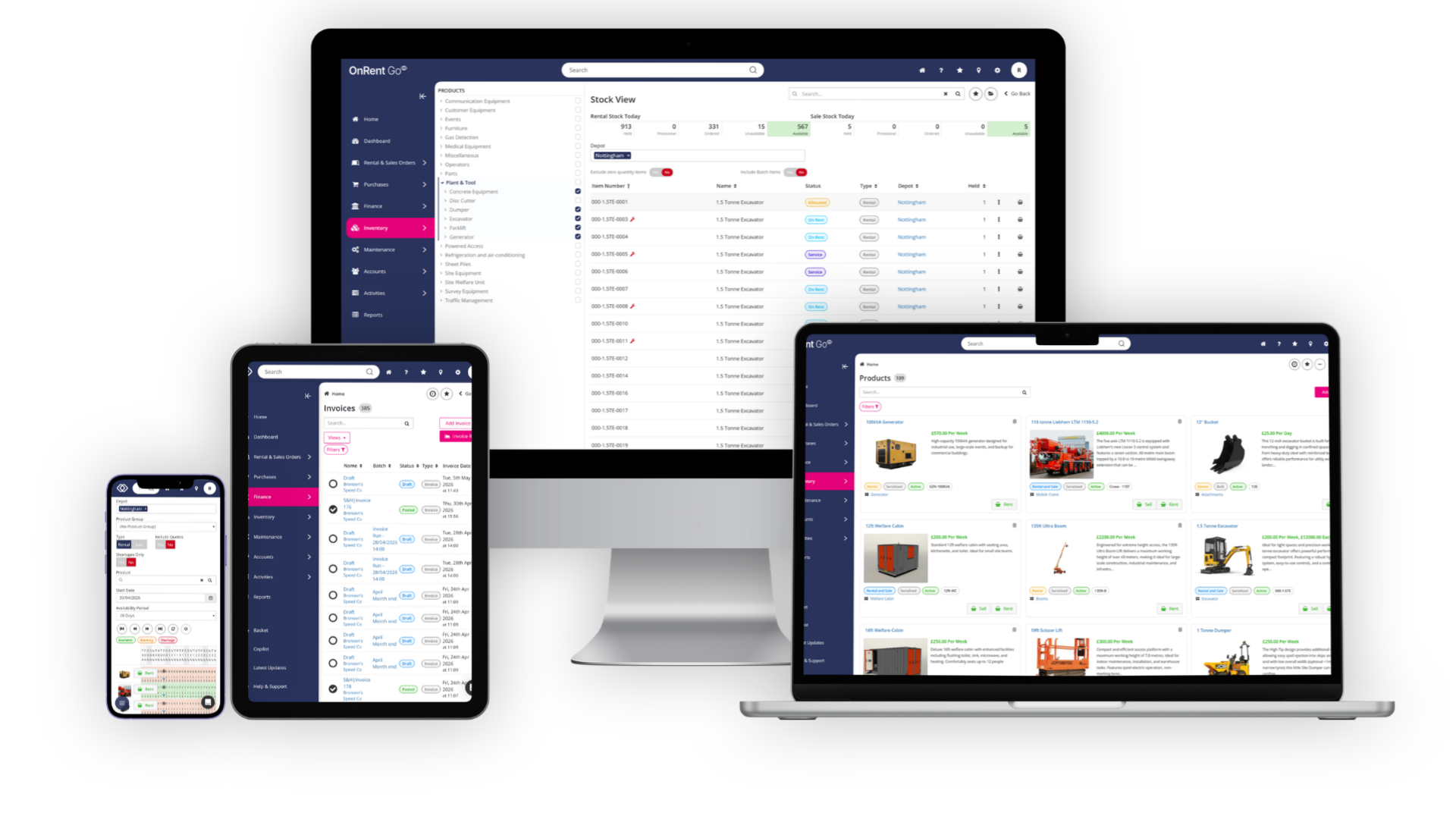
OnRent Go is designed around the opposite principle. Every step in the rental cycle is reversible, every record is editable, and the system is built to support the way hire actually works, rather than forcing teams to work around it. A booking amendment, a delivery cancellation, a return reversal; these are standard workflow actions, not support tickets. A dispatch can be cancelled after creation, automatically reverting affected order items to their pre-movement state. A return processed in error can be reversed, putting items back on rent without manual corrections. Every change carries a full audit trail showing who changed what and when.

The order lifecycle is designed around the reality that hire is rarely linear. Every order moves through three clear states; Quote, Provisional and Order, each with distinct effects on stock, availability and charging. A Quote is a pricing proposal that does not reserve or affect availability. A Provisional Order reserves availability without triggering charging, protecting against double-booking, and holds the equipment while the customer decides. A confirmed Order commits stock, starts the billing clock, and flows seamlessly into dispatch, delivery, invoicing, collection and return. At any point, with the right permissions, an order can be transitioned backward as well as forward.

Each order line carries its own independently editable delivery date, charging start date, collection date, and charging end date. A welfare unit can arrive on day one, a generator not until week three, and a lighting tower can stay out indefinitely on an open-ended basis, all on the same order, each line with its own rate definition. Five distinct rate engines cover every pricing model used in construction equipment hire: daily, weekly, monthly, fixed and multiplier-based ladder pricing with configurable hour, half-day, day, week and month tiers. Leeway minutes, weekend charging, minimum hire periods and excess usage metering are all built in.
When a job is booked, availability updates across every depot in real time.

When equipment is ready for dispatch, the delivery note is created, and the driver has everything they need to get a digital sign-off on the run. Invoicing can be triggered at any point in the hire cycle, individually or as a batch run, because the billing record is always connected to what has actually happened on the job. Pre-delivery and off-hire inspections, proof of delivery and collection, photographic evidence and document attachments are built into every stage of the hire workflow, so the record of what happened is always complete and always accessible.

Every step flows automatically into the next, with the ability to build in digital approvals at each step. Whether one person manages the entire operation or a team of specialists handles each stage, responsibilities can be clearly defined and easily managed through configurable dashboards and role-based security. For construction plant and tool hire businesses operating across multiple depots with large, diverse fleets and complex logistics, that means one thing above everything else: a single, live, trustworthy picture of the entire business.

OnRent Go has been pivotal in modernising how we operate as a business. What started as a manual, paper-based system has evolved into a unified digital platform that has transformed our visibility, efficiency, and customer service. Equipment tracking has become seamless: machines are now monitored for utilisation, maintenance records and location, ensuring transparency and accountability across the business."

Chloe Spencer, Rental Specialist, Centurion Plant Hire.


Equipment Availability:

Always know where your equipment is, and whether its ready.

 
OnRent Go Mockups

Ask any operations director in a complex multi-depot hire business what keeps them up at night and availability will be somewhere on the list. Not because the fleet isn’t large enough, but because knowing exactly what’s available, where, in what condition and whether it’s compliant, across every site, in real time, is harder than it should be.
The problem scales with the operation. At one depot, a phone call fills the gap. Across four, ten or twenty sites, the gaps multiply faster than phone calls can close them. Equipment gets double-booked because one site’s availability record isn’t visible to another. Machines sit idle at a depot in Birmingham while a customer in Leeds is told nothing is available. A fleet investment decision gets made on the assumption that utilisation is healthy, when the data to confirm it simply isn’t accessible in one place.
The financial consequences are real. Industry data shows that almost a quarter of large construction plant and tool hire businesses report average fleet utilisation below 59%. At a fleet of 200 to 499 assets, the revenue sitting idle in a yard at any given time is not a rounding error, it’s a material gap between what the business could be earning and what it actually is.

One fleet, one live picture

OnRent Go’s Product Availability View gives the hire desk a live, colour-coded picture of every product’s rental and sale stock across a rolling date range, filterable by depot, product group, specific product and time period. Each product row shows available quantity day by day with the total fleet in brackets, colour-coded green for available, amber for low stock based on a configurable buffer percentage, and red for shortage. Five demand categories break down what is consuming availability: Quoted, Provisional, Ordered, Sub-Rented and Unavailable. An Include Quotes toggle lets the hire desk see true committed demand versus pipeline demand. A Shortages Only filter surfaces just the products in deficit and clicking through opens a full booking drill-down showing every order consuming that stock.

Every serialised asset carries its own individual record showing its full lifecycle in one place; every hire, every service, every stock movement, every meter reading, every checklist result, every unavailable period, accessible from a single tabbed view. The Stock View shows the entire fleet as a searchable, filterable list with live status badges, a product group hierarchy tree for browsing by category, and a slide-out preview panel that surfaces the asset’s current state, active links, depot, dimensions and next maintenance due date without opening the full record.

For visual scheduling, the Item Booking Screen provides a drag-and-drop timeline for allocating, managing and adjusting bookings directly. Drag a reserved booking onto a specific asset to allocate it, drag between asset rows to reallocate, extend or shorten by dragging the edges, or revert to unallocated in a single action, all without opening a single order record.

My favourite part of OnRent Go is how it integrates all the business processes. I can create quotes and offers for customers without availability being affected. When items are returned damaged, they are automatically marked as unavailable, ensuring we can repair and service them easily. Everything is interconnected, giving us full visibility, reducing mistakes, and resulting in happy customers."

Nuno Couceiro, Managing Director, Ameno.


Invoicing & Revenue

Invoice faster. Get paid in full.

At the scale a large construction plant and tool hire business operates, billing is a revenue protection function as much as an administrative one. The difference between billing everything you should and billing most of what you should, across hundreds of assets and thousands of hire events a year is not insignificant. 

The causes are well understood. Damage on return that never made it onto a damage notification. Minimum hire periods not applied. Check-in and check-out records missing. Draft invoices that sat in a queue without a clear process for review and correction. Finance teams in large construction and heavy plant hire businesses are often at the end of a long chain of operational decisions, inheriting records they didn’t create and errors they didn’t make. Each issue is small in isolation. Across multiple depots, multiple hire desks and multiple systems that don’t talk to each other, they are often invisible until someone sits down to reconcile the numbers.

The fix is not more process or more checking. It’s connection. When the job record, the delivery record and the invoice live in the same system, the gaps close themselves. But connection alone isn’t enough. In most rental systems, once a process has moved forward it’s difficult or impossible to go back. A mistake at the booking stage creates a workaround at the invoicing stage. A return processed incorrectly requires a call to support. Teams learn to live with errors rather than correct them, because correcting them is harder than carrying on.

OnRent Go Laptop Mockup - Invoicing

Flexibility and data integrity go together:

With the right permissions, any step in the rental lifecycle can be revisited and corrected: a booking amended, a delivery cancelled and order items automatically reverted, a return reversed, an invoice adjusted, a credit note raised directly from a posted invoice with date-range precision on individual lines. The workflow guides the team forward but never traps them.

For larger operations with defined roles and responsibilities, permissions can be set to ensure changes are made by the right people at the right stage, with a full audit trail of what changed and when.

The Invoice Run processes all applicable orders in a single automated batch with granular control: depot filters, Invoice Run Codes that group orders by customer or billing cycle, separate switches for rental and workshop invoicing, and background processing so the system stays usable while the run completes. Run Codes are particularly powerful; national accounts can run on the first of the month while short-term hires run weekly, and disputed orders can be excluded entirely until resolved. Invoice batches can be reviewed before posting, bulk-emailed in a single action with customisable messages, separate PDFs per invoice and per-customer email tracking that surfaces failed sends with the underlying error.

Klipboard Money brings integrated payment capability throughout the hire lifecycle. Pay-by-link sends a secure hosted payment page to the customer via email. Tokenised cards stored against the account enable one-click payments on future orders. Recurring billing automatically charges stored tokens as part of the invoice run, posting the invoice and payment to the connected accounting system simultaneously. For customers at the counter, card terminal payments are recorded directly against the order. And for returns where the customer is present, Invoice at Book-In combines the return, damage assessment and invoice generation into a single action.

For contractors and customers, that means accurate invoices, faster. For your finance team, it means visibility and control over the billing cycle before invoices go out, not just after errors come back. And for the business, it means revenue that was always earned, finally showing up in the accounts. Klipboard Money connects payments directly to your business, so you can reduce admin, get paid faster, and always know exactly where your money stands. Watch our short video to learn more:


Equipment Maintenance
& Compliance

Keep equipment safe, compliant, and out on hire.

In construction, heavy plant and tool hire, compliance is not a back-office function. It’s a legal obligation that sits at the centre of the operation, and in a sector where excavators, telehandlers, MEWPs and lifting equipment are routinely deployed to contractors on regulated construction sites, the consequences of falling short are serious.

LOLER and PUWER set out clear duties. Equipment must be thoroughly examined at defined intervals, records must be maintained and producible on request, and anything with a defect must be taken out of service until it is rectified. Fines for non-compliance range from £10,000 to several hundred thousand pounds. In serious cases, directors and managers can face prosecution and imprisonment. One construction company was fined £120,000 when a worker was injured due to an unexamined lifting accessory that failed during a lift. The HSE reported that between April 2024 and March 2025, 124 workers died in work-related incidents across Great Britain. Construction accounted for 35 of those deaths. The duty of care for hire businesses begins before equipment leaves the depot.

Beyond the regulatory obligation, there is a straightforward commercial argument. An asset out of service is an asset not earning. An asset that fails on a contractor’s site is a customer relationship, a potential claim and a reputational risk, all at once. At a fleet of 50 to 499 assets, the cumulative cost of reactive maintenance and unplanned downtime is not a minor operational frustration, it's a material drag on utilisation and revenue.

Proactive maintenance and usage-based servicing.

OnRent Go makes compliance and maintenance proactive across the entire fleet. Two scheduling approaches cover every maintenance scenario. Days Lapsed triggers based on calendar time from the last service date, with a configurable look-ahead window that warns at order creation if allocated equipment has maintenance due during the hire period. Days Used triggers based on actual usage, hire days or engine hours, so equipment is serviced when it genuinely needs it, not before and not after. A Mandatory flag on either type controls enforcement: when set, book-out is fully blocked if the order dates overlap with the next service date or the equipment is already overdue; when not set, a warning is shown and the user can proceed.

Service chaining links maintenance types together so that completing a major service automatically includes and closes out lower-interval services. A 2000-hour service that supersedes the outstanding 250-hour and 50-hour checks completes all three in one visit, with only the most recent service showing on the maintenance schedule going forward.

Checklists built from configurable task types: free text, numeric, boolean and dropdown, can be assigned to products as pre-delivery or off-rent requirements that trigger automatically at the relevant workflow stage. Each task can be set as mandatory, and a failed mandatory checklist blocks the associated workflow until the issue is resolved. Up to four photos per checklist item create a visual audit trail for inspections and handovers, and all results are logged against the stock item record permanently.


Rental-UX-1

Asset Tracking.

When Klipboard Asset Tracking or any of the ten other supported telematics integrations are connected, meter hours flow directly into the asset record. Service works orders raise themselves when the threshold is hit without waiting for the machine to return to depot. Inspection certificates, LOLER and PUWER records stored against each individual asset are accessible instantly from any device.


Logistics and field teams

Give your field teams the tools to work from anywhere.


OnRent Go - On site workers

A construction and heavy plant hire operation lives or dies on what happens in the field. Not in the office, not on a spreadsheet, but on the sites where equipment is delivered, collected, inspected, and signed off. When that part of the operation runs cleanly, customers notice. When it doesn’t, they notice that too.


The gap is always information. Drivers working from paper job sheets don’t know if a job has changed until someone calls them. Yard teams managing availability on whiteboards are working from a picture that was accurate an hour ago. Technicians logging faults manually at the end of a shift create a delay between something going wrong and anyone in the operation knowing about it. Each gap is small. Across a large, distributed workforce operating out of multiple depots, they compound into something more significant: missed proof of delivery, unbilled damage, compliance records that don’t reflect reality, and a management overhead spent chasing updates that should already be in the system.

One platform. Every device. No app store required.

OnRent Go is a fully responsive web application that scales automatically to any device size (smartphones included) with no app store download required. Drivers and depot operatives access it via their mobile browser and can add it to their home screen as an app icon. A pre-defined Drivers role restricts visibility to the user’s own assigned movements, keeping the interface focused on what matters: their jobs for the day, directions via Google Maps, and the tools to capture digital proof of delivery and condition on arrival.

Digital signature capture records four data points at every movement: the signature itself with date and time, the signer’s printed name, the GPS location where the signature was taken, and any photographs or documents attached at the point of signing. For returns, a decoupled signing option allows drivers to collect the customer’s signature on site without automatically confirming the movement and booking items back into stock. The return is logged as signed but unconfirmed, allowing a separate team member; a depot operative, workshop fitter or office staff to review condition and confirm later. This means damage checking is handled by trained depot staff rather than drivers.

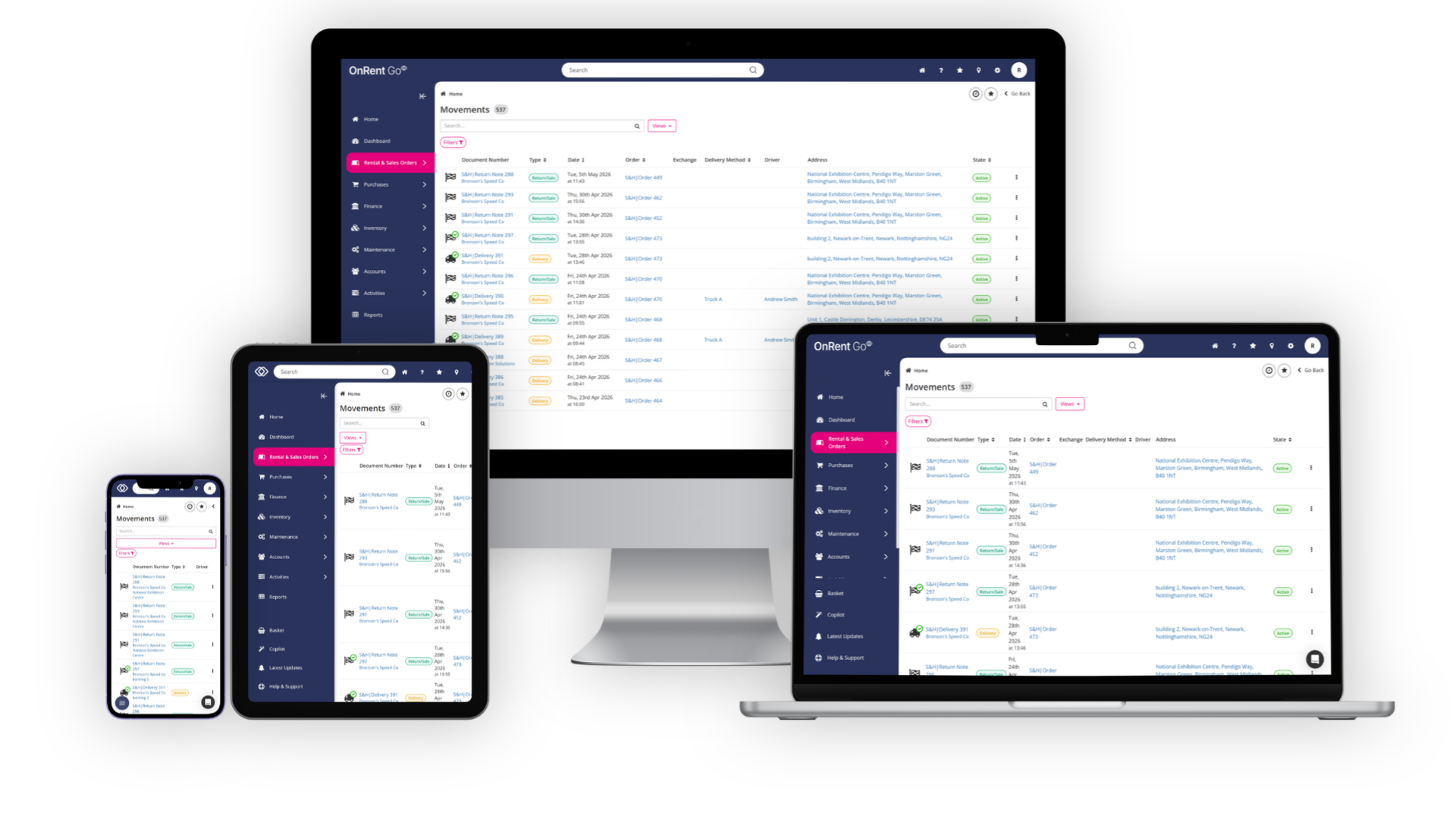
The Movement Scheduler provides a visual transport planning screen showing all dispatches, deliveries, return requests and returns in a calendar layout. Two views; Schedule and Timeline, give transport coordinators a drag-and-drop interface for assigning unallocated movements to vehicles, rescheduling by stretching or moving tiles, and reassigning drivers without leaving the screen. Vehicles appear with name, photo and registration once the movement vehicle toggle is enabled.

Automated SMS notifications keep customers updated at key trigger points; dispatch, return request confirmation and works order activation with customisable message templates and personalisation placeholders, reducing inbound calls chasing delivery status.


Reporting & Business Intelligence  

Get the insights to run a smarter hire business.

Most large construction, heavy plant and tool hire businesses have more data than they know what to do with. Telematics platforms generating utilisation signals. Finance systems producing revenue reports. Operational systems logging job activity. The volume of data is not the problem. The problem is that it lives in separate places, requires manual effort to consolidate, and by the time it has been assembled into something useful, it is already describing last week rather than this morning.

The result is a reporting picture that most senior leaders in construction hire would recognise: static exports that are out of date before they are reviewed, spreadsheets built offline by someone who no longer works there, dashboards that reflect what someone had time to update rather than what is actually happening. The businesses that make the best decisions at scale do not have better instincts. They have a live, drillable view of performance at asset, depot, and group level from one system.

Dashboards built around how each role works.

OnRent Go’s dashboard is built from individually configurable widgets that each user can add, reposition, resize and customise. Any saved Custom View can be pinned directly onto the dashboard as a live data widget, turning a filtered list of orders due back today, overdue returns, or items awaiting collection into a role-specific task list that updates in real time. Purpose-built widgets cover top selling products, top rented products, order summaries, product group utilisation, individual product utilisation, activities due, top customers and sales stock health, each available as tables or charts in multiple formats. An AI Prompt widget generates bespoke briefings from live system data every time the dashboard loads.

The Daily Digest email delivers a customisable summary every morning. Each user selects which dashboard pods appear in their digest, so a fleet manager receives utilisation data, a finance director receives aged debt and invoice run status, and an operations director receives overdue returns and maintenance due, all before the working day begins.

Custom Views extend far beyond dashboards. Every record type in the system; orders, accounts, products, stock items, works orders, purchase orders and more, can have bespoke list views with configurable columns, filter criteria and role assignments. Five pre-built Order Items views are provided out of the box: items due for return, items on a return request, reserved items due for delivery, allocated items due for delivery, and dispatched items due for delivery. Custom views can be exported to CSV via background processing with email delivery, and custom export templates allow column selection and renaming to match target system requirements.


Klipboard AI

Intelligence built into your rental workflows.

Every conversation about AI in the hire industry eventually arrives at the same question: what does it actually do in practice? Not in theory, not in a product demo, but on a Monday morning when the hire desk is busy, the yard is short-staffed and three customers are waiting for availability confirmations.

The honest answer for most businesses right now is that AI is doing less than it should. Not because the technology isn’t capable, but because the tools being explored tend to sit outside the core rental management system, drawing on incomplete data and producing intelligence that reflects the gaps in that data rather than the reality of the operation. Klipboard AI is built directly into OnRent Go and operates across two distinct modes, each fundamentally different in what it can do.

Generative mode lets users ask questions and surface information across the entire rental business in plain language. View customer accounts, balances and payment terms. Check stock levels by depot and company. Look up availability at a point in time or across a hire window. View open orders, individual order lines, movements, purchase orders and PO lines. Surface revenue, utilisation, margin, and tax data from the reporting engine without running reports manually. View invoices and totals, CRM activities, system configuration and available exports. The answers are already in OnRent Go. Klipboard AI surfaces them instantly, without anyone needing to navigate to find them.


Agentic mode goes further. It takes action. Create new customer accounts, add contacts, log CRM activities. Raise new rental and sales orders and add product lines, services and stock items. Add notes to orders for site instructions or special handling. Generate draft invoices for review before posting. Delete draft invoices, order items, notes, and contacts where the user has permission. Run live lookups, availability checks, on-demand reports and CSV exports. And critically, chain multiple steps in a single instruction: find a customer, locate their latest order, check availability for additional kit, add it to the order and draft the invoice, all from one plain-language prompt with confirmation at each stage.

Every action respects the user’s existing role permissions. The AI will only show or do what that user is permitted to access. All AI-assisted actions carry a full audit trail. The system moves work through a process rather than simply describing what needs to happen next.

AI-block-image-Rental-2

For anyone who has ever spent ten minutes finding something that should have taken ten seconds, or completing a task that required navigating four screens when one conversation should have been enough; this is exactly what Klipboard AI is for.


Closing the knowledge gap.

There is a workforce dimension to this too. As experienced operators retire and newer team members come through, the knowledge gap between a seasoned hire desk manager and someone six months into the role is significant. Klipboard AI narrows that gap. A team member who might otherwise spend weeks learning the nuances of availability, pricing and contract management can work with confidence from day one, because the system supports them with the same knowledge an experienced colleague would provide.


The construction, heavy plant and tool hire businesses that move fastest on AI will have a structural operational advantage. Better decisions, faster responses, less management overhead. OnRent Go has it built in today, accessible from every screen in the system via the persistent Copilot button in the navigation bar.

Download the PDF or book a demo to learn what Klipboard AI can do in your hire operation today.


Klipboard eCommerce: Let customers come to you

Customer expectations in construction and heavy plant hire are shifting. The same project managers and site agents who book hotels, order materials and schedule couriers online increasingly expect to browse your fleet, check availability and submit a hire request without picking up the phone. Not as a replacement for the relationship, but as an additional channel that works outside office hours, reduces inbound call volume and gives your team a qualified lead rather than a cold enquiry.

Klipboard eCommerce is an optional add-on that gives cash and account customers a self-service online channel to browse your catalogue and submit rental reservations or sales orders. It’s pre-integrated with OnRent Go. All reservations come through as quotes in OnRent Go and require depot staff to confirm, check availability, take payment and convert to a live order. The hire desk retains full control of pricing, availability and customer engagement; the channel adds capacity and qualified leads without surrendering operational control.

Online rental reservations allow customers to select products, rental start and end dates and accessories, with the reservation created as a quote in OnRent Go. Online sales orders for consumables and accessories can be placed alongside hire requests or independently. Mixed baskets combine rental and sale items in a single submission.

Product pages display the leading hire rate alongside a full rate breakdown; daily, multiple-day, weekly and subsequent-day rates, so customers can estimate costs before submitting. Account-specific pricing applies automatically when an account holder logs in, displaying their contracted rates rather than standard list prices. Associated accessories follow the rules configured in OnRent Go. Registered customers can reload saved baskets and view their order history, making repeat hires faster.

For businesses not ready to display pricing publicly, Brochure Mode hides prices for all viewers except approved logged-in account holders. The home page, product pages and navigation menus are customisable through a built-in editor, and product images uploaded in OnRent Go sync automatically to eCommerce. PDF manuals, specification sheets, and YouTube walkaround videos can be attached to product pages. A built-in analytics dashboard shows online order activity by day, week and month.

OnRent Go Hero Image

The operational reality

The challenges covered in this blog represent the operational reality for many large construction, heavy plant and tool hire businesses in the UK&I.

Generic ERPs that don’t understand rental workflows. Legacy systems running out of road. Billing gaps that are hard to quantify but real. Compliance records that are mostly in order but not entirely. Reporting that describes last week rather than this morning.

The difference between the businesses that thrive over the next three to five years and those that simply manage is not fleet size, customer base or market position. It’s operational control. A live, connected picture of the entire hire operation, from first enquiry to final payment, that gives every team member the information they need without compensating for the gaps in the system around them.

That's what OnRent Go is built for. Not adapted for. Not configured to approximate. Built for, from the ground up, specifically for how construction, heavy plant and tool hire works.

Book a demo today to learn how OnRent Go can transform your hire business:


Similar posts

Want to learn what we can do for your business?